Compliance Built Around INFOR M3 Workflows
How Advintek Supports INFOR M3 e-Invoicing
- ERP Transaction Extraction: Relevant Infor M3 orders, billing records, and commercial information are retrieved for electronic invoice processing through Advintek.
- Business Data Mapping: Customer, product, tax, and billing information is mapped into the required structured invoice fields.
- Invoice Content Screening: Mapped transaction data is reviewed using configured checks to identify incomplete or inconsistent invoice information.
- Electronic Invoice Formatting: Approved information is organized into structured e-invoice records while retaining references to originating Infor M3 transactions.
- Recipient Delivery Processing: Prepared invoice records are sent through configured delivery channels based on recipient and transaction requirements.
- ERP Status Association: Processing responses are connected with corresponding Infor M3 records, supporting reconciliation, invoice review, and financial follow-up.
What Advintek Adds to INFOR M3
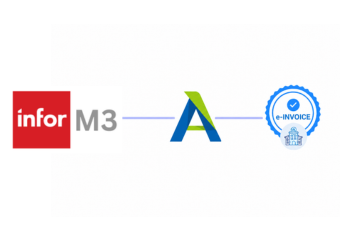
Advintek’s e-invoicing platform connects INFOR M3 data with structured invoice processing, helping finance teams coordinate commercial records, tax information, customer details, accounting workflows, and connected operations.
- Extracts commercial records from INFOR M3 accurately
- Maps ERP fields into structured invoice records
- Checks configured data before invoice processing
- Links invoices with originating ERP transactions
Value for Businesses Using INFOR M3
- Automated Invoice Preparation: Automated invoice preparation reduces repetitive administrative tasks across finance operations using INFOR M3 transaction data.
- Consistent Field Mapping: Structured field mappings help maintain consistent customer, tax, product, and transaction information across invoice workflows.
- Finance Activity Visibility: Connected processing gives finance teams clearer visibility into billing activity originating across INFOR M3 operations.
- Source Transaction Review: Linked source records help users compare processed invoices against corresponding commercial transactions during financial review.
- Controlled Document Handling: Configured controls support consistent handling of invoices generated from approved INFOR M3 business activities.
- Connected Accounting Integration: Advintek coordinates INFOR M3 invoice information with accounting systems through structured financial data exchanges efficiently.
Core Capabilities for Lithuania E-Invoicing
Customer Identifier Alignment
Customer identifiers can align across INFOR M3 and electronic invoice records for consistent recipient details.
VAT Classification Support
Configured VAT classifications support appropriate treatment across relevant INFOR M3 invoice transactions.
Invoice Reference Tracking
Invoice references remain accessible for finance teams reviewing processed e-documents and source transactions.
INFOR M3 Invoicing Support in Lithuania
Businesses using INFOR M3 can connect operational records with Lithuanian invoicing processes while preserving relationships between customers, products, sales activity, tax information, invoices, and connected financial systems.
- Connect customer accounts with invoice workflows
- Coordinate tax details across business transactions
- Review electronic documents through INFOR M3
- Reconcile invoices with originating ERP activity
Start Lithuania E-Invoicing Integration
Connect INFOR M3 with Lithuanian invoice workflows through Advintek.
Discuss your ERP integration needs with specialists.
Ready e-Invoice System
FAQs Infor M3 and Lithuania E-Invoicing
How can Infor M3 billing schedules support invoice generation?
Infor M3 billing schedules can provide timing and transaction information relevant to invoice preparation. Advintek can use configured billing data to create structured invoice records while retaining references to the related Infor M3 transactions. This helps businesses coordinate billing activity with electronic invoice processing without changing the underlying ERP billing structure.
Can Infor M3 shipment records contribute to invoice data?
Yes. Shipment and delivery records in Infor M3 can provide useful transaction context for invoices, including delivered items, quantities, customer references, and related order information. Advintek can incorporate relevant shipment data into the configured invoice workflow, helping businesses maintain a connection between fulfillment activity and the electronic documents generated from those transactions.
How are Infor M3 payment terms reflected in invoices?
Payment terms maintained within Infor M3 can provide relevant commercial information during invoice preparation. Where supported by the configured mapping, Advintek can transfer applicable payment conditions and related billing details into structured invoice records. This allows e-documents to retain important commercial context originating from the ERP transaction.
Can Infor M3 purchase information support supplier invoicing?
Infor M3 purchasing records can provide source information for supplier-related invoice workflows, depending on the configured integration. Relevant purchase orders, supplier details, item information, quantities, and transaction references can be mapped into the processing layer. Advintek can then validate and organize applicable information for the intended electronic invoice workflow.
How can Infor M3 reporting data support invoice reconciliation?
Infor M3 reporting and transaction records can provide useful references when finance teams review processed invoices. Advintek can associate electronic invoice outcomes with relevant ERP information, allowing users to compare source transactions, billing details, and processing results. This supports reconciliation activities while keeping invoice processing connected to the organization’s existing Infor M3 environment.